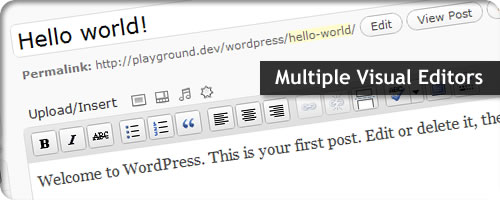
I’ve gotten a few requests on how to add multiple visual editors in WordPress. So here is a quick way to add multiple WordPress Visual Editors to your meta boxes.
I’ll make this post short and sweet; This article is kind of a follow up to: How to Move and Position The WordPress WYSIWYG Visual Editor.
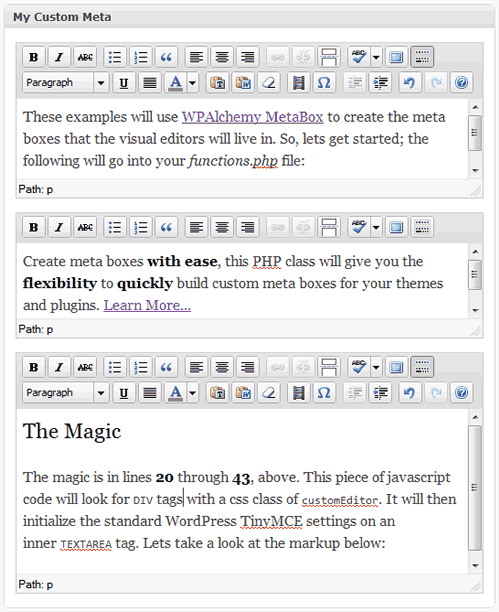
I’ve gotten a few requests on how to add multiple visual editors in WordPress. Here is a quick screenshot to wet your appetite:
Lets Get It On
These examples will use WPAlchemy MetaBox to create the meta boxes that the visual editors will live in. So, lets get started; the following will go into your functions.php file:
<?php
// lets use the WPAlchemy helper
include_once TEMPLATEPATH . '/WPAlchemy/MetaBox.php';
// custom constant (opposite of TEMPLATEPATH)
define('_TEMPLATEURL',WP_CONTENT_URL . '/themes/' . basename(TEMPLATEPATH));
// custom css for our meta boxes
if (is_admin()) wp_enqueue_style('custom_meta_css',_TEMPLATEURL . '/custom/meta.css');
// create the meta box
$custom_metabox = new WPAlchemy_MetaBox(array
(
'id' => '_custom_meta',
'title' => 'My Custom Meta',
'template' => TEMPLATEPATH . '/custom/meta.php'
));
// important: note the priority of 99, the js needs to be placed after tinymce loads
add_action('admin_print_footer_scripts','my_admin_print_footer_scripts',99);
function my_admin_print_footer_scripts()
{
?><script type="text/javascript">/* <![CDATA[ */
jQuery(function($)
{
var i=1;
$('.customEditor textarea').each(function(e)
{
var id = $(this).attr('id');
if (!id)
{
id = 'customEditor-' + i++;
$(this).attr('id',id);
}
tinyMCE.execCommand('mceAddControl', false, id);
});
});
/* ]]> */</script><?php
}
[/code]
<h2>The Magic</h2>
The magic is in lines 20 through 43, above. This piece of javascript code will look for <code>DIV</code> tags with a css class of <code>customEditor</code>. It will then initialize the standard WordPress TinyMCE settings on an inner <code>TEXTAREA</code> tag. Lets take a look at the markup below:
[code lang="php" gutter="1" firstline="1"]
<div class="my_meta_control">
<?php $mb->the_field('extra_content'); ?>
<div class="customEditor"><textarea name="<?php $mb->the_name(); ?>"><?php echo wp_richedit_pre($mb->get_the_value()); ?></textarea></div>
<?php $mb->the_field('extra_content2'); ?>
<div class="customEditor"><textarea name="<?php $mb->the_name(); ?>"><?php echo wp_richedit_pre($mb->get_the_value()); ?></textarea></div>
<?php $mb->the_field('extra_content3'); ?>
<div class="customEditor"><textarea name="<?php $mb->the_name(); ?>"><?php echo wp_richedit_pre($mb->get_the_value()); ?></textarea></div>
</div>
Making it Pretty
Finally I added a little bit of CSS adjustments/corrections to make it look good:
/* custom editor styles */

.my_meta_control .customEditor
{ margin:15px 6px; border:1px solid #ccc; }

.my_meta_control .customEditor textarea
{ border:0; }

#post-body .my_meta_control .customEditor .mceStatusbar a.mceResize
{ top:-2px; }

/* extra styles used in other WPAlchemy meta boxes */

.my_meta_control .description
{ display:none; }

.my_meta_control label
{ display:block; font-weight:bold; margin:6px; margin-bottom:0; margin-top:12px; }

.my_meta_control label span
{ display:inline; font-weight:normal; }

.my_meta_control span
{ color:#999; }

.my_meta_control textarea, .my_meta_control input[type='text']
{ margin-bottom:3px; width:99%; }

.my_meta_control h4
{ color:#999; font-size:1em; margin:15px 6px; text-transform:uppercase; }
The Nitty Gritty
The above is very controlled, but expectable usage. The hard core developers amongst you maybe thinking … what if I want to theme the editor differently, like in some of the TinyMCE examples?
Well, I tried several different setups to no avail. Do I think its possible, sure, you’ll need a little bit more time and you can definitely find a definitive answer on whether or not you can do it.
Another solution may be to use a different editor for your custom WYSIWYG needs, I’ve had great success with CKEditor on other projects, I would recommend you give it a try.
I hope the above helps you in some way … let me know how your using it and good luck!
Dimas,
Its easier than that.
WAY easier.
Like one line of code easier.
$metabox->the_field('description'); the_editor($metabox->get_the_value(), $metabox->get_the_name());It should also be possible to pass custom values for the TinyMCE init options to the_editor. There are a number of filters you can use too, which you may be able to work with to give different values in different situations (by looking at what is there already). That should give you the flexibility to deal with each differently
Hi Dimas,
I am very glad to see WPAlchemy evolving and even though I don’t need this functionality right now, it’s welcome.
I’ll test drive it this days 🙂
Adam, thanks for the tip. This has given me more insight into the WordPress TineMCE editor usage.
However, my initial tests with
the_editor()function were not very successful. Although I was able to get a second editor on the page, the switching between HTML and Visual did not work as expected.When looking at the function, defined in
/wp-includes/general-template.php, it seems that there are hard coded element IDs which I think cause the conflict (this also signifies to me that this function is more of an internal WordPress function).Another thing to note, is that the WordPress filters for TinyMCE, seem to only be setup to affect the main editor.
Anyway, do I think a developer can work around certain issues, of course … do I think it’ll be easy … umm, not really, it’ll take a little bit of time and figuring things out.
Dimas,
Sorry, I forgot to mention that. I also noticed the lack of switching. However, you should be able to overcome that with some JavaScript.
From the code:
Theoretically, $prev_id should be the thing… however, “title” makes no sense for a default and its not used as far as I can tell. I think its time for a rewrite and a patch. I hate it when I find these things… its just more work for me. 😉
I think there is a way to overcome the problems with filters, but when I submit my patch I’ll try to make it easier to distinguish instances.
Dimas you legend!! Thanks for the multiple WYSIWYG stuff, I shall give this a try over the weekend.
Thanks 🙂
So what happens if you put HTML in the WYSIWYG?
Ah ha!!!
Ok I’ve gotten the Visual/HTML tabs to work. Again, its just a matter of poking around things.
if ( user_can_richedit() )
	wp_enqueue_script('editor');
wp_enqueue_script('word-count'); //if you want it
Now the Style for the text area used by the HTML tab isn’t quite right but that’s easy to fix.
Dimas, thanks a lot for taking time and writing this up! It’s huge help in learning WP.
@Adam, very helpful comments – thank you 🙂
Adam’s code does bring the editor into play (complete w/ HTML/richtext toggling). but the above enqueue_script(‘editor’) breaks things for me…. throwing up all kinds of jQuery isn’t defined errors. the problem w/ ‘the_editor’ is that there is only 1 default height value- so if you have 3 or 4 of them for different reasons, then you end up w/ an absurdly long post page.
Anybody have any ideas on how to hide the standard post editor when a template isn’t going to be using it?
Hi Dimas, You know the line above the standard wysiwyg, which features the add image, add video etc buttons? Could that be added to each additional wysiwyg also? Reason I ask, I am using a google maps plugin which adds an additional icon to this list for adding maps and streetview, I would ideally love to be able to have this icon and the row it is with above each additional meta wysiwyg. Thanks
i did figure out the answer to my question from above. in case anybody else would like to use jquery to hide the WP post box based on template… i added this to the document.ready function:
ID,'_wp_page_template',TRUE); if ('template-home.php' == $template_file ) { echo "$('#postdivrich').hide();"; } ?>This was very useful to me in my current project. However, i needed to customize the buttons available in the TinyMCE toolbar. WP provides the tiny_mce_before_init and other filters to customize the buttons but that affects the main editor as well as my additional ones.
So the solution is to create your own TinyMCE ‘settings’ array before calling tinyMCE.execCommand like so:
settings = {mode:"specific_textareas", width:"100%", theme:"advanced", skin:"wp_theme", theme_advanced_buttons1:"bold,italic,strikethrough,underline,|,bullist,numlist,blockquote,|,justifyleft,justifycenter,justifyright,|,link,unlink,|,spellchecker,|,formatselect,forecolor,|,pastetext,pasteword,removeformat,|,outdent,indent,|,undo,redo,|,code", theme_advanced_buttons2:"", theme_advanced_buttons3:"", theme_advanced_buttons4:"", language:"en", spellchecker_languages:"+English=en,Danish=da,Dutch=nl,Finnish=fi,French=fr,German=de,Italian=it,Polish=pl,Portuguese=pt,Spanish=es,Swedish=sv", theme_advanced_toolbar_location:"top", theme_advanced_toolbar_align:"left", theme_advanced_statusbar_location:"bottom", theme_advanced_resizing:"1", theme_advanced_resize_horizontal:"", dialog_type:"modal", relative_urls:"", remove_script_host:"", convert_urls:"", apply_source_formatting:"", remove_linebreaks:"1", gecko_spellcheck:"1", entities:"38,amp,60,lt,62,gt", accessibility_focus:"1", tabfocus_elements:"major-publishing-actions", media_strict:"", paste_remove_styles:"1", paste_remove_spans:"1", paste_strip_class_attributes:"all", wpeditimage_disable_captions:"", plugins:"safari,inlinepopups,spellchecker,paste,wordpress,tabfocus"};
// then the code from your tutorial:
		jQuery(function($)
		{
			var i=1;
			$('.wysiwyg-editor').each(function(e)
			{
				var id = $(this).attr('id');

				if (!id)
				{
					id = 'wysiwyg-editor-' + i++;
					$(this).attr('id',id);
				}
				// here we assign our custom settings before creating our wysiwyg
				tinyMCE.settings = settings;
				tinyMCE.execCommand('mceAddControl', false, id);

			});
		});
Note that I have added the ‘code’ button to my toolbar which effectively replaces the need for the Visual/HTML tabs.
Hope this is useful to someone…
By the way, if you want to only include your extra scripts and styles on the WP post pages use this:
global $pagenow; if ( in_array( $pagenow, array('post.php', 'post-new.php') ) ) { ...your code to enqueue scripts, styles etc... }Thank you so much for the code sample.
Like David, I am also curious how to go about adding in the wp gallery buttons to each instance. Would love to see how it is done if someone has the time for an example snippet.
Robert, awesome addition! When I have a moment I will add a section to the article about that.
that is super cool Robert. Thank you for sharing! you wouldn’t happen to know how to add buttons that are added to the regular tinyMCE editor by plugins such as Link to Post would you?
Dimas,
I’ve been thinking about this and your code takes WordPress into the realm of the generalized CMS. One thing that the current custom post feature gets wrong is that each post type can, at best, belong to its own hierarchy. That’s by design but I might want to have a page which is a press release and another which is a project description and provide adequate controls to content authors so they don’t need to know markup.
Fine that’s why we all use custom metaboxes. So in a pathological case lets say I have 10 “variations” for a page. I could just put all the meta boxes in there all the time but that provides the opportunity for confusion and you run the risk of getting bad data if someone populates content in multiple metaboxes (assuming they’re mutually exclusive).
What would be a GREAT addition to your code is a drop down, or similar control that lets you select the post “sub type” (to coin a phrase). It is effectively a drop down list of some or all of the metaboxes added. As the user selects an option, that metabox will become visible and as an option theEditor disappears.
I’m thinking something like:
$custom_metabox = new WPAlchemy_MetaBox(array
(
	'id' => '_custom_meta',
	'title' => 'My Custom Meta',
	'template' => TEMPLATEPATH . '/custom/meta.php',
        'switcher' => array(
            'include' => true, // this should be implied by the presence of the array?
            'hideEditor' => true,
            'title' => 'optional different title',
            'position' => 3 //something to give you control over the order in the list.
      )
));
Now maybe it needs to be a different class that you create after the fact but I think that this will really work well for a huge number of use cases.
@Dimas – You’re welcome. It’s what open source is all about – sharing.
@kathy
Well, you could study the plugin you mentioned and see how they do it. There is a codex page about this here: http://codex.wordpress.org/TinyMCE but not much in terms of useful code. You can check out the links there tho.
To add buttons to a particular toolbar area you can use these filters: mce_buttons, mce_buttons_2, mce_buttons_3, mce_buttons_4
To manipulate the complete tinyMCE settings array use: tiny_mce_before_init
And to add yor own tinyMCE ‘plugin’ you can use: mce_external_plugins
If you’re adding your own buttons, you need to write a ‘plugin’ to tell the button what to do when it’s clicked.
So to add a button and a plugin handling the button to tinyMCE you’d do:
if ( get_user_option('rich_editing') == 'true' ) {
    add_filter( 'mce_external_plugins', 'add_my_tinymce_plugin' );
    add_filter( 'mce_buttons', 'add_my_tinymce_button');
}
Then, you need to know how set up your plugin code and your button but that’s a lengthy tutorial, not so suited for a comment :). However, you should be able to study existing plugin code to gain that insight.
@Robert- Thanks for the reply! I will check into that more tomorrow when I am feeling fresher. Between this and trying to add upload functionality to the meta boxes my brain is a touch fried tonight. And i just watched 3 eps of the Jersey Short, which I am sure killed a few brain cells.
thankfully the plugin code for LinkToPost is already complete. I studied it a bit and saw how they were adding it to the regular editor, but ran into a wall trying to add it to the editors I called w/ the code from this post (And your code for the settings array) for the meta boxes. i’d also liked to add the media/image button, so hopefully things will look clearer to me tomorrow.
@kathy
1. I am also trying to add file upload functionality to the meta boxes. I have tried the approach outlined here: http://austinpassy.com/2010/03/creating-custom-metaboxs-and-the-built-in-uploader/ and it works OK by using the WP built in Thickbox media popup.
However, this seemed a bit of a roundabout way so now I’m getting lower into the hierarchy and looking at using the SWFUploader object directly so I can just have an “Upload Files” and “Cancel” button right in my metabox. I got it to work on a basic level (it’s uploading files and attaching them to the post) but now the trick is to create the user feedback UI just like the media uploader does. This involves writing a whole lot of JS handlers for the SWFUpload events.
You also have to create your own media-upload.php script that handles the actual file upload and attaches it to the post (if that’s what you want) based on the async-upload.php from the wp-admin folder.
2. To add the LinkToPost custom button, you should be able to add it’s handle to one of the ‘theme_advanced_buttons*’ elements as well as add the corresponding plugin handle to the ‘plugins’ element. Not sure if there is anything more to it…
3. The media/image buttons are not part of the wysiwyg as such and they are added separately. You can study the ‘the_editor()’ function to see what it does but basically, the media buttons are added via:
@Robert! Thanks again… with the help of your reply and some fresh eyes I have the Link2Post button conditionally showing in TinyMCE. Not ever having fooled w/ tinyMCE I didn’t know I needed both the button and plugin handles.
I had been using the old version of Valum’s Ajax Upload and wp_handle_upload in my theme options panel pretty successfully. I have not been able to duplicate that with the updated script. And haven’t come close to getting it to work w/ the metaboxes. The upside was that uploading an image in this way is super easy for the user end. Click the button select the file and I automatically saved it to my theme options array and had jquery show the image and generate a remove button. The downside is that it doesn’t go through the Media manager, so it isn’t attached to anything, isn’t in the DB, doesn’t have captions/alt-text, AND you can upload the same image a gazillion times which could take up lots of space on the server.
I really appreciate the info you’ve provided. I had been searching for something along those lines but wasn’t finding much. some stuff in the codex is still very shrouded in mystery.
@Robert-
I wanted to share what I did to get the media uploader working on multiple buttons in the meta boxes (And not interfere w/ the regular post media buttons). By pulling the post_ID into a variable I can preserve the ability to ‘insert to post’ immediately after the manager finishes ‘crunching’ the image, w/o having to click over to the Media Library tab.
I still haven’t decided if I like the ajaxupload method better, but i do like that this gets the images into the DB as attachments and while it is 2 more steps than AjaxUpload (Insert to post and save) those steps are already familiar and expected. and another thing it has going for me right now is that it works while i still can’t get my head around the new AjaxUpload. 🙂
jQuery.noConflict();
jQuery(document).ready(function($) {
var ww = $('input[name=post_ID]').val();
var which_button;
$('.meta_upload_button').each(function() {
var button = $(this);
$(this).click(function() {
which_button = button;
window.send_to_editor=window.send_to_editor_clone;
tb_show('', 'media-upload.php?post_id=' + ww + '&type=image&TB_iframe=true');
return false;
});
window.send_to_editor_clone = function(html){
imgurl = $('img',html).attr('src');
forminput = which_button.prev('input');
forminput.val(imgurl);
tb_remove();
}
}); //end each
}); //end document ready
in case my code doesn’t display properly here is the pastebin: http://pastebin.com/nCz0Z0nv
now just to mix up a little more code for remove buttons and image previews
Hello everybody!
First i want to say big thanks to Dimas to share this class and the documentation with us: Thank you very very much!!!
So far everything works fine for me – i just experienced two little problems:
1. If i want to use a WYSIWYG editor in a repeatable area where i want to work with a button to add an item (“have_fields_and_multi”) the added editors dont work – it shows with a small textfield but its not possible to select the textfiled. Anybody who can reproduce this?
If i use it with an automatic repeating area (“have_fields_and_one”) everything works fine.
2. @Robert: I tried to costumize the TINYMCEs buttons with your code – but i am not able to get that working. I have added the line with the setting directly in the line before “jQuery(function($)”, after “/* <![CDATA[ */" – and i have added "tinyMCE.settings = settings;" in the line before "tinyMCE.execCommand('mceAddControl', false, id);"
After i have added the code the WYSIWYG editor is not shown – i get a normal textarea.
Kind regards,
Christian
@Christian
Note that I have used a textarea with a class of: wysiwyg-editor. the original example wraps the textarea in a div of class: customEditor.
You need to look at the line:
$('.wysiwyg-editor').each(function(e)and replace it with the original:
$('.customEditor textarea').each(function(e)if your HTML is based on the original tutorial.
@Robert
Thanks for your answer! I had added only those two lines to the code, so i had used the class “.costumEditor”:
http://pastebin.com/Vqq19BJa
Any idea why it doesnt work for me?
Kind regards,
Christian
@Christian
Hm, not sure what could be wrong. All looks ok to me. Now, I can’t see your HTML. But if it works without the additions from my post, that is puzzling.
What version of WordPress are you using? Maybe also, check with Firebug if you have any Javascript errors when the page loads. You can try to step into the JS for the editor setup to see if it executes.
hth.
Hi Dimas,
Thanks for this great article and wpalchemy.
Ive setup my edit pages with multiple meta boxes, and along with the default editor, one more metabox has the tinymce editor using your technique above. I’m having some trouble with it, the second tinymce editor is stripping tags, it doesn’t strip any other tags such as or etc. Just the tags.
Do you have any advice on what might be causing this?
Hi Dimas,
Thanks for your code. I’ve just been trying to implement this into a new theme settings page I’m building.
I’ve placed the code in the functions.php file.
The 3 textareas does get the correct ID’s so I know the jquery script is working but the tinymce editor does not appear.
When I look at it through Firebug there’s a javascript error: Uncaught ReferenceError: tinyMCE is not defined
I’m guessing that this means that the tinymce editor has not loaded?
Any idea what could be wrong?
Got it working!
I added the following before the script and that solved the javascript error.
add_action('admin_init', 'editor_admin_init');
add_action('admin_head', 'editor_admin_head');

function editor_admin_init() {
  wp_enqueue_script('word-count');
  wp_enqueue_script('post');
  wp_enqueue_script('editor');
}

function editor_admin_head() {
  wp_tiny_mce();
}
The code in this tutorial saved me hours and hours of work, thanks a lot!!
I thought I had this working, but I just found a problem: when the text added has paragraphs (or line breaks), on saving they disappear. Does anyone have the same problem?
Hi Suso,
I was also having this problem, and could not figure it out unfortunately. Hopefully you’ll have a bit more luck than me.
Ok, I think I found the problem. For some reason, when saving the meta values using the WPAlchemy class, the new lines aren’t being transformed to <br>. This happens when using directly update_post_meta().
Dimas, any ideas why? it looks like a bug…
sorry, the lines get transformed to not
sorry again, forgot to escape: the lines get transformed to <p> not <br>
I appreciate everyone’s input on this up to this point but I hope I can get an answer for why mine’s not saving. Basically, I got the wysiwyg on all my textarea, 4 to be exact, and they are working great but won’t save the content when I update the post. It works fine until I add the wysiwyg to the textarea so I know it’s some sort of conflict with the script. Has anyone else had this issue?
Any help would be greatly apprecaited!
@Jared, if you can, I recommend you post your code using https://gist.github.com/ so that myself and others can help you.
Wow, thank you for this code. It’s been extremely helpful. However I’m stuck on this (hopefully) little thing.
I added the media buttons using the code that is in the first comment. However when I add an image using the default uploader and try to add it to my second MCE editor it is automatically placed in the standard post MCE.
Can anyone tell me what I’m doing wrong?
Thanks
i have loaded the code and for the most part everything is working perfectly … almost. for some reason the line breaks or paragraphs are not saved when i pull the data into my template.
i don’t understand. it looks fine in the editor … and if i format the text in another way (like make it bold), that formatting is saved. but all the output seems to be on one line. why would it not save the line breaks?
any ideas?
This code along with alchemy meta boxes is outstanding. Question… how can I set the default height of the TinyMCE editor? They are really tiny. I’d like the to default to a taller height.
DOH!!! I just spent half an hour googling and looking at all this TinyMCE documentation trying to find out how to initialize it in such a way to have the textarea a bigger default height when it suddenly struck me… just go into the metabox php template and a rows attribute to the textarea element. Good old HTML circa 1995. LOL.
This look great, I’try to my theme-options.php page, but nothing show…
I think there’s mistake on the script, coz the footer not show
Need help for solution??
Sorry if my English so bad.. 🙂
Hi – I am having the same issue as Suso above – line breaks and paragraphs not being retained in the TinyMCE textarea metabox after saving. Has anyone else seen this or been able to fix it?
Thank you!
Never mind – I figured it out. (Apologies in advance – I cannot figure out how to get both html and php to display together in these comments using the pre tag so I’m just including the key bits of php. )
To get the meta fields to remember paragraph and line breaks, use wpautop like so in the meta.php template in the textarea’s value attribute:
echo wpautop($metabox->get_the_value('field_name'));And like so in your custom theme templates to get things to display correctly:
echo wpautop($custom_metabox->get_the_value('field_name'));Hope this helps someone!
I was wondering if someone paying attention could help me. I have the “lines 20 through 43” added into my functions.php file. I added just that because I already had my metaboxes made and didn’t need to go about recreating them, but still wanted the wysiwyg editor on some text areas. The problem I’m running into is that doing just the javascript, is pushing the textarea draggable corner outside the container metabox, and it’s not allowing any sort of styling to them. I can paste code as needed, as I am not sure what code would be needed initially.
Hi,
Great tutorial, thanks Dimas. I’m currently using @kathy’s suggestion of adding a Media Upload option into my TinyMCE-wrapped Meta Box and running into some trouble.
In fact, my HTML looks like this:
    <label>Benefits</label>
  <p>
    <?php $mb->the_field('benefits'); ?>
    <div id="media-buttons" class="hide-if-no-js"><?php do_action( 'media_buttons' ); ?></div>
    <div class="customEditor">
      <textarea name="<?php $mb->the_name(); ?>"><?php echo wp_richedit_pre($mb->get_the_value()); ?></textarea>
    </div>
  </p>
(Sorry for the ugly inclusion)
You’ll notice that I add the #media-buttons div right above the .customEditor div. The upload works great but when I click “Insert into Post” nothing happens, or sometimes it will actually insert it into the main, default content box at the top.
Does anyone know how I can have unique media uploads for each TinyMCE’d meta box I’m creating?
Thank you.
Hello Friends
This article awesome . I am trying to implement but I don’t understand how to implement.Please help me its urgent.Its completely as I need.
I shall be very thankful to you all please help
Having same/similar issue as @Mike B. I added another wysiwig to the excerpt box and now when i use the media uploader and click “insert into post” it will actually post to the excerpt box.
Hey Dimas,
I’m having trouble using this inside of a have_fields_and_multi group–the “add field” (‘docopy’) button stops working and I get an error when it is clicked: “Uncaught TypeError: Cannot read property ‘0’ of null” on post.php:113…
Any ideas?
Okay, so I have the most part working now, and really impressed.
I got the media buttons to show above the meta box however have the same issue as some did above where inserting the image doesnt go into the meta box but goes into the regular post box at the top. Is there a solution for that? I am looking at Kathys example of the script but not sure how to implement properly.
Thanks in advance.
Hi Dimas, wanted to update you…
So I have got 3 new wysiwyg’s
Sidebar 1
Sidebar 2
and Bottom Content (Optional)
I have made two new templates for thesis using the following method which allows for the user to select them on the fly from the templates drop down on the right hand column of the edit page screen instead of having to use conditionals to decide where the templates should be in action…
http://alextheafrican.wordpress.com/2010/05/16/add-a-custom-page-template-to-wordpress-thesis-theme/
Here are examples of the two templates using custom meta content for the additional columns.
http://room1.one3rdnerd.org/one-sidebar/
http://room1.one3rdnerd.org/two-sidebars/
This is brilliant for sidebar content flexibility when your dealing with 100 pages or so and don’t want to fill up your widgets page too much. 🙂
I have the issue with ‘s getting script sorted, the only issue I would like some advice on is having the media uploader auto add the new content to the relevant meta box instead of the main content area? Any thoughts?
Oh yeah, and the html/visual tab issue. I don’t quite understand the guys fix several comments above?
Finding there to be a few too many issues for me to take on with ‘the_editor()’ and ‘wp_tiny_mce()’, I decided to use the methods provided here. Using @Robert’s and @Kathy’s suggestions, I just really refined the send_to_editor functionality so that I could use upload media buttons with my new editors. Again, this is all done, pre-3.1 so there might be a better way to complete these tasks, I have just been unable to find them. I would like to know it if anyone else does.
I was having trouble with pasting the code here so I put it all up at pastebin.
Setup the metabox:
http://pastebin.com/y3t5BrVS
(NOTE: I am doing this for ‘types’ => array(‘products’))
The metabox template:
http://pastebin.com/snZHvkEg
(NOTE: I wrapped the media buttons with a class ‘custom_upload_buttons’. This is important for the jQuery.)
The Javascript:
http://pastebin.com/0bjJa3th
(NOTE: I use execInstanceCommand from the TinyMCE API… ref: http://tinymce.moxiecode.com/wiki.php/API3:method.tinymce.execInstanceCommand)
And just for fun… some CSS:
http://pastebin.com/Z1SLzYbG
I hope this works for everyone. Let me know if you have any questions.
Found the issue with the Linebreaks and Paragraph formatting being removed.
The TinyMCE is actually adding those in the field, however it’s not displaying once you have it on editor side. Here’s how to solve it.
Just use wp_richedit_pre(); in your code to echo the content of the text area:
So, an example of a custom meta box would be:
Where is the code found under the heading “The Magic” supposed to go?
is there “upload media” in this visual editor ?
@Aaron, I can’t get your solution to work when I have multiple WYSIWYG edit boxes. It works fine for one box, though.
Hi guys,
I’ve successfully added multiple meta-boxes in my wp admin, however I’m having trouble getting auto paragraphs to work in my template. I’ve tried the following code, but can’t get paragraphs to format properly.
get_the_value('column_three')); ?>

or

the_value('column_three')); ?>
How can I get wpautop to work in my template?
Thanks.
It appears I was using the wpautop function incorrectly.
In order to get wpautop working properly on the output of the wysiwyg in a template you can use the following code:
https://gist.github.com/943979
@Bill
What is the problem? I have been using it with multiple editors for a while now and haven’t noticed a problem.
Here is a screen shot of how I am using it on my current project:
http://www.aaronvanderzwan.com/multiple_wysiwyg.png
Hi Dimas,
Thanks for sharing this and for all of your hard work with the MetaBox class, it’s been a massive help.
I have a question – Should multiple visual editors work with textareas inside a MetaBox have_fields_and_multi while loop? The first visual editor in the loop works fine but when the docopy function is used to add another textarea, the added textarea appears to be disabled, it can’t be clicked.
Do you have any ideas?
Hi Dimas,
do you happen to know a way to get the html/visual toggle buttons (i thought i solved this, but i can’t recall how) and the media upload buttons to work the same as w/ the normal post editor? essentially to duplicate the entire post box functionality.
why is tinymce so hard?
-kathy
should have read more… turns out i already found the answers once here! BUT i found this really cool resource:
http://hitchhackerguide.com/2011/02/12/wp_tiny_mce/
and it turns out that you can filter the buttons in the tiny_mce editor (instead of using the settings method described earlier)
function add_code_button($mce_buttons){
$mce_buttons[] = 'code' ;
return $mce_buttons;
}
add_filter('mce_buttons','add_code_button');
i don’t want to “fix” the settings, b/c if i add a plugin in later that adds buttons i want that to work too.
still working on the media buttons. i know i solved that (it is in the threads here at on the metabox class page) but i want it to behave like the original and not just insert the url… thinking hats on!
@Kathy
Maybe you are looking for something different and I misunderstood, but the media button adds the image in the textarea… not just the URL (see column 4).
http://www.aaronvanderzwan.com/multiple_wysiwyg.png
http://www.farinspace.com/multiple-wordpress-wysiwyg-visual-editors/#comment-11163
@Aaron – thanks for pointing that out! i feel kind of dumb for not seeing that.
one thing i just came across is that when using Sortable on divs containing custom editors, the editors go blank when the sort order is changed.
@Aaron – if i have multiple boxes using that my images keep getting sent to the last one. i’ve commented out all of my personal code and totally replaced mine w/ the post your referenced, so i am relatively sure its coming from that. did you come across this?
@all
I have updated the Javascript, I think it may have been an old version at pastbin. Here is the new URL for javascript:
http://pastebin.com/BCF7A0wu
@Kathy
See if this helps.
A limitation I should note:
With this updated JS, the relationship between the media link and the textarea is fixed…
This is set on line 22 of the JS with:
$(this).parent().next(‘textarea’).attr(‘id’);
This is fairly self explanatory. You can edit this to meet your needs or just make sure that your media buttons (<a>) are the child of your textarea’s previous sibling. This is done in the metabox template (Line 6 and 7).
Also, so that all the URL’s are in one place:
Setup the metabox:
http://pastebin.com/y3t5BrVS
(NOTE: I am doing this for ‘types’ => array(‘products’))
The metabox template:
http://pastebin.com/snZHvkEg
(NOTE: I wrapped the media buttons with a class ‘custom_upload_buttons’. This is important for the jQuery.)
The Javascript:
http://pastebin.com/BCF7A0wu
(NOTE: I use execInstanceCommand from the TinyMCE API… ref: http://tinymce.moxiecode.com/wiki.php/API3:method.tinymce.execInstanceCommand)
And just for fun… some CSS:
http://pastebin.com/Z1SLzYbG
@aaron et al.. the tinyMCE.execInstanceCommand wasn’t getting the right ID, so it was always defaulting to the final box. i fixed this by getting the ID of the following texarea (assuming you use Aaron’s markup). i used a new variable name b/c i don’t understand scope and didn’t want it to interfere w/ the editors) on the click
//add "media" buttons to metabox

$('.custom_upload_buttons a').each(function() {

$(this).click(function() {
mediaid = $(this).parent().next('textarea').attr('id');
window.send_to_editor = window.send_to_editor_clone;
});
window.send_to_editor_clone = function(html){
tinyMCE.execInstanceCommand(mediaid, 'mceInsertContent', false, html);
tb_remove();
}
});
@Kathy
That is correct. See the updated JS at pastebin.
yup! works great. thanks for the help! curious about why you changed :
id = ‘customEditor-‘ + i;
from:
id = ‘customEditor-‘ + i++;
does it no longer need to autoincrement?
now, next challenge for me is getting this to work w/ have_fields_and_multi. i thought i could wrap the whole thing in a livequery wrapper, but the editors don’t load…. yet
have_fields_and_multi
@Kathy
‘i’ does need to autoincrement but jQuery passes this to the each() callback function (not limited to). You can see I receive ‘i’ on line 10:
$(‘.customEditor textarea’).each(function(i){
Good luck with the multiple fields. Have not tried that yet.
@aaron- thanks! i need it. the following gets the ID numbers to properly increment.. had to go back to the i++ counter since livequery doesn’t support an index like .each(). i was hoping that would solve it, and the tinymce buttons do appear, but they don’t do anything yet, nor do they allow the textarea to be edited.
var i=1;
$('.customEditor textarea').livequery(function(){
$ta = $(this);
id = $ta.parent().attr('id');
if (!id){
id = 'customEditor-' + i++;
$ta.attr('id',id);
}
if($ta.parent().hasClass('minimal')){
tinyMCE.settings = tinymceConfigs[1];
} else {
tinyMCE.settings = settings;
}
tinyMCE.execCommand('mceAddControl', true, id);
})//end livequery
btw-
tinyMCE.execCommand(‘mceAddControl’, true, id);
should actually be:
tinyMCE.execCommand(‘mceAddControl’, false, id);
wish i could edit so it doesn’t look like i am just spamming Dimas’ comments!
@Aaron- i just noticed that my tinyMCE boxes aren’t saving p tags (anymore… i think they used to?) have you run into anything with this?
@Kathy
I have not noticed this issue, but haven’t touched it in a little while. I am using 1.4.4 of WPAlchemy and am still on WordPress 3.1.1.
(I just tested this and it works fine with my configuration.)
@Aaron- damn i was hoping you’d have a miracle answer. thanks for looking. i’m pretty much using your code as is… the metabox and the footer script.
i just rolled back to version 1.4.4 too… but am still finding that the p tag isn’t making it into my database!
this:
echo wpautop($custom_metabox->get_the_value(‘sample_text’));
seems to be quasi working (but i don’t know yet how reliably) while
$custom_metabox->the_value(‘sample_text’);
strings it all into one line.
In my metabox template, in the textareas, I am using this:
echo wp_richedit_pre($mb->get_the_value());In my template for the public page, I am using:
echo apply_filters('the_content', $thevariable)This seems to work.
@Bill – that’s clutch!
Has anyone got this working using the WPAlchemy $mb->have_fields_and_multi() function? I’ve spent the entire day trying to get it working and find myself at a lost.
I can get it duplicating, but the duplicate tinyMCE editors have a 28px height, won’t let you click on it to enter content and the tool bar doesn’t work.
Any help on this would be much appreciated.
@Anthony
I played with that a bit but with the time I had was unable to figure it out either. It has something to do with the TinyMCE, the live() jQuery function, and the way that WPAlchemy replicates data for the have_fields_and_multi function (JS around line 1300). I know it is going to take a bit of tweaking in these areas to make this usable.
Let us know if you make any progress on it. I will too if I have time to take another swing at it.
Hello, is it possible to limit the amount of buttons that appear in these boxes with tinyMCE? I have a few boxes that really just need the basic stuff like bold/italics/bulleted lists etc.
Awesome job, thanks!
I will do my best to review all the comments posted here and amend the original post.
@Aaron
I was able to figure out a solution that I hope works for everyone, there might be a better way, but it doesn’t require a lot of tweaking.
The main issue with the cloning was the fact it was cloning the DOM after TinyMCE was run on the hidden editor to be cloned. I tweaked the jQuery to only apply TinyMCE to the visible editors, leaving the editor to be copied as unaltered HTML.
You can view the updated jQuery on Pastebin.
I have a stupid question. I have tried doing this on a custom post type and from the backend everything looks cool. I can add and change content on all visible editors. Now my question is how do publish the data on my page. I have tried all.
Ok. i have figured it out. I was only meant to read other posts. This is cool. Thanks a lot. everything works just perfect. I have one last question. How to i get the bullet points to work. I can use them on the editor but they don’t show up on the theme. Is there any way of acivating the HTML editor of the TinyMCE?
@vezu, install TinyMCE Advanced, that’ll do the trick for you in order to get other TinyMCE buttons, including source editor. (although bullets should be working fine without it). I think there is also a tutorial on here that tells you how to get the original wordpress view buttons on these.
@Joren, thanks a million, I will try that. Maybe it’s my template causing issues. I will double check that too.
What in the living hell is
include_once TEMPLATEPATH . '/WPAlchemy/MetaBox.php';?I don’t have any such folder or file, or see instructions here on just what
MetaBox.phpis.@Ed, my apologies, the article should probably leave out my custom meta box class but the overall code/idea really isn’t dependent on it.
Dimas:
Sorry about that. Too much coffee. I found the WPAlchemy download package (you sure make it hard to find!) and installed it.
TinyMCE settings are working out very well!
@Dimas
I have an issue when making repeatable TinyMCE fields. The added fields are always unclickable until I update the post.. Any thoughts?
Opps, didn’t noticed that my issue was discussed in the comments above.
@Anthony Clark’s JS works for me, but not perfectly. The last added field are always added as normal HTML textarea without TinyMCE loaded. However, when I add a new one after that, that one gets replaced by TinyMCE, and the same thing happens with the new last field. So let us say I added a new field ‘1’, which doesn’t have TinyMCE buttons. After that I added a new one ‘2’. Now ‘1’ will get TinyMCE buttons, and ‘2’ will not.. etc.
But still great to get it working at least.. thanks Anthony!
Hmm, re-reading Anthony Clark’s comment again, I think it’s intended behavior.
Hmm, something horrible happens when you try to resize sortable TinyMCE boxes. The field gets dragged and stuck with the mouse pointer and you cannot drop it anywhere..
Well. Just fixed the resize issue by excluding the TinyMCE div from the sort handle using ‘cancel’ option:
$('.wpa_loop').sortable ({

cancel: ':input,button,.customEditor',

change: function() {

$('.sort-warning').show();

}

});
The two issues remain now when using this combination (Repeatable + Sortable + TinyMCE fields) are the following:
(1) After saving the post, the field contents don’t get filtered. It appears as HTML plain text inside the editor (e.g. A bolded word will appear after saving as: word)
(2) When you drag a field to resort it, all of its contents will be disappeared, although it’s still there and you can see it after updating the post. (Looks like iFrame’s contents get dropped by jQuery sortable function?)
Any thoughts/workarounds would be appreciated :^D
CORRECT:
HTML strong tags get filtered by the blog:
(e.g. A bolded word will appear after saving as: strong>word /strong>)
@ma’moun – i think you might need to tell tinyMCE to turn off while sorting and then re-initialize once the new sort order is established.
This works great. But is there any way to get Visual and HTML tabs, so we have the same options as in the regular WordPress text editor?
Thanks.
@kathy
Thanks for directing me. I’m still noob in JS. From sortable function reference here: http://jqueryui.com/demos/sortable, I think that I need to use ‘start’ event to turn TinyMCE off and ‘update’ event to re-initialize it. I think I can use the same initializing function that is already implemented to initialize the fields, right? But I don’t know how can I turning a TinyMCE field off. As I see here: http://tinymce.moxiecode.com/wiki.php/Command_identifiers, I can use mceRemoveControl command to do this, but I couldn’t get things working. I’m a little bit confused.
Could you, or anyone else, help me to accomplish this? I really think that getting this combination working would be useful for many other users.
@Ma’moun “I’m still noob in JS”.. i know the feeling. especially when it comes to tinyMCE.
anybody using the media buttons?
if i click on them for my metabox it works correctly and inserts the image into that metabox’s editor. but then if i click on the version associated w/ my regular post editor.. it inserts into the last metabox editor i added an image to.
i suspect that window.send_to_editor is not being set back to it’s normal self afterwards. anybody fix this? or am i the only one having this issue?
again, i wish there was an edit button! 🙂 need to back up and then restore the original send_to_editor:
$('.custom_upload_buttons a').each(function() {

$(this).click(function() {

mceID = $(this).parent().next('textarea').attr('id');

backup = window.send_to_editor; // backup the original 'send_to_editor' function

window.send_to_editor = window.send_to_editor_clone;

});
window.send_to_editor_clone = function(html){
tinyMCE.execInstanceCommand(mceID, 'mceInsertContent', false, html);
tb_remove();
// restore the default behavior
window.send_to_editor = backup;
}
});
How the hell could anyone get this working? It just doesn’t work for me. I mean, forget about the repeatable and sortable fields combination that I was trying to get, I am talking about the editor basic functionalities. TinyMCE advanced editing buttons are all getting loaded, and I can use them modifying the text. However, once I updated the post, all of the field contents get displayed as HTML plain text.
@Dimas Care to be my hero figuring that out :^D?!
@ma’moun – did you add this:
echo wp_richedit_pre($mb->get_the_value());
in your metabox template.
the_field('sample_content'); ?>
<textarea rows="10" cols="50" name="the_name(); ?>" rows="3">get_the_value()); ?>
@kathy
Yep. I already did.
Oh, just tried to use the class function the_value() without passing it to wp_richedit_pre() and it works now! Isn’t that strange?
GOD… adding to the sorting issue, I’ve just found another issue when saving non-ASCII text, like Arabic. It doesn’t get encoded properly. Looks like I’m going to shoot my-self… &|
This is actually applicable to all of the class fields, not just the rich editor. @Dimas …?
Hi guys, do you think this is applicable to a field in multi fields ? The id generated for the textarea of tinyMCE is alway the same…
Hi ! I solved the issue of tinyMCE in multiple fields : in MetaBox.php, replace from line 1408 to 1415 by :
var id;

var num;

if (the_clone.find('div.customEditor'))

{

the_clone.find('div.customEditor').children().not('textarea').remove();

the_clone.find('div.customEditor').children('textarea').removeAttr('style');

num = $('.customEditor').length;

id = 'customEditor-' + (num+1);

the_clone.find('.customEditor').children('textarea').attr('id', id);

}
if ($(this).hasClass('ontop'))
{
$('.wpa_group-'+ the_name +':first', p).before(the_clone);
}
else
{
the_group.before(the_clone);
}
if (the_clone.find('div.customEditor'))
{
tinyMCE.execCommand('mceAddControl',false,id);
}
Remember that you must use the code above to create wysiwyg (a div with a class “customEditor” and a textarea in it).
@Ma’moun
Same thing happening to me. It saves OK the first time. But once I go back into the page & save the front end show all the html markup. So it seems it cannot parse HTML. You mentioned you resolved it to some degree. Any chance I could have your solution? What code did you exactly amend?
Cheers, Sahus
@Sahus did you get the last version of wp alchemy ?
@Sylvain Yes have latest WPAlchemy being v1.4.14!!!
I managed to get it working one way!!! By changing this line in my meta template file:
From:
echo wp_richedit_pre($mb->get_the_value())To:
$mb->the_value()So removing wp_richedit_pre I know have a solution which allows me to input simple copy and adjust using tinymce controls and these actions are saved in both the admin and frontend such has bolding text. No HTML is being spat out to the frontend or adminUI like before 😉
However I now have an another issue with line breaks not saving. I guess wpautop should help???
@Kathy – you seemed to have an issue similar to mine. Basically my editor is not saving p tags. I saw that you mentioned wpautop on this comment
http://www.farinspace.com/multiple-wordpress-wysiwyg-visual-editors/comment-page-4/#comment-15170
But it didn’t help!!! Can you tell me if you managed to resolve this and if so what got it working? Thanks in advance!!! Cheers, Sahus
Sahus, try this out :
echo wpautop($mb->get_the_value());
Hope this’ll help !
@sahus – sorry i only just know saw your comment to me. tinyMCE does NOT save p tags…. wordPress adds them automatically where it thinks they belong (i don’t always agree but that is a nother discussion)
at first i tried:
echo apply_filters('the_content',$mb->get_the_value());
but i ran into problems w/ that b/c some plugins hook into the ‘the_content’ filter… (ones that add tweet buttons for instance) so then i was getting crazy content in places i didn’t want it.
so- this is the solution i came up with was to create my own filter and attach the functions i want to it… sort of recreating filters that are attached to ‘the_content’. i have this in my functions.php
//recreate the default filters on the_content

add_filter( 'meta_content', 'wptexturize'        );

add_filter( 'meta_content', 'convert_smilies'    );

add_filter( 'meta_content', 'convert_chars'      );
//use my override wpautop
if(function_exists('override_wpautop')){
add_filter( 'meta_content', 'override_wpautop' );
} else {
add_filter( 'meta_content', 'wpautop' );
}
add_filter( 'meta_content', 'shortcode_unautop' );
add_filter( 'meta_content', 'prepend_attachment' );
and then where i want the text blocks to appear in my theme i use:
echo apply_filters('meta_content',$mb->get_the_value());
anybody else having trouble with
echo wp_richedit_pre($mb->get_the_value())
in conjunction with the insert media buttons… or any HTML really? it is converting the code brackets to their html character equivalents so that the html isn’t being applied, it is getting printed.
i don’t know why i am running into this just now. obviously need to preserve both the img and header tags AND the linebreaks that wp will convert into paragraphs.
Three cheers for @kathy! Your solution worked perfectly both in my custom meta boxes and in the template files. Thanks!
Okay, thought I understood everything going on here. I think I am missing something…
I try using
wpautopand it adds tons ofuland/ularound my un-ordered lists.If I use
wp_richedit_preit shows the html tags instead of the actual html wraps.Any thoughts here? Anyone get the editor to look the right way in the admin area? I have it looking right on the front end.
First off thank you Dimas for this wonderful class!
I have been following closely the comments from both Aaron and Kathy
Thanks to both for the code and insight you shared. Everything works as described however when I update my post the contents display in html format instead!
Could someone please point me to the right direction to fix this if possible?
Thanks!
@ kathy and others that have been having problems with the html being printed instead of being executed.
Using
wptexturizeand thenwpautopon the user input before sending the content to the database</storng and thenesc_html($mb->get_the_value());for displaying the content in the metabox seems to work for me.Can someone else confirm that this works in their case too?
I can provide example code if anyone needs it.
@Sarah,
Can you post sample code? I have the same issue. I would like to see how this works.
Anyone else having issues with P and UL?
Ok, I’ve tried… wpautop… i get in return p tags which is good, but as several stated, I also get multiple ul inserted. If I save again, without changing anything hey multiple and have like 10 or more ul tags.
I’ve wp_richedit_pre, now my ul work, but now I lose the p tags. UGH!
Does anyone know of a way to fix this? It seems like it should be simple, but apparently it’s not.
To duplicate this, try adding several paragraphs in your editor, now add several bullet points. click save and then look at the code you now have. click save again and it gets worse.
HELP! Any ideas?
My solution is :
Install the plugin TinyMCE Advanced and check “Stop removing the and tags when saving and show them in the HTML editor”.
Juste show the content of your textarea with :
echo $mb->get_the_value();
It works fine for me.
@Sylvain,
Thanks, that works, but I need this to work for a plugin I’m working on.
I found a solution to fix waky ul’s and paragraphs. It works.
I added a javascript file I borrowed from TinyMCE Advanced…
I’ve posted it here…. paste it right after the javascript that Dimas posted above. That’s what I did.
Here’s the linke: https://gist.github.com/1190684
Thanks for the code. I am having problems when adding additional meta box groups. I have tried a few different javascript resources from these comments but can’t get any to work.
When I add a new meta group I can’t edit the TinyMCE until I save the page and go back into it. Have anyone got the same problem/solution. Thanks.
I’ve used this several times on many websites and it’s worked awesomely, but I just grabbed your latest version (which now places the WPAlchemy folder inside wp-content and inclue a setup.php from the metaboxes folder, the old versions I used relate to this post more accurately with the WPalchemy folder inside the theme) but when I tried using the latest version, any WYSIWYG textareas would replace their data with the HTML but in the “Visual” view, so that when the page would update it would replace all of the syntax with & code. I switched everything over to old files that I had laying around from previous websites and it worked perfectly.
Also I just noticed another issue, it doesn’t accurately portray WordPress’ image caption shortcode.
Nevermind, I figured that last bit out by surrounding it with apply_filters. Sorry to waste your time on that haha 🙂
and i’m back to having the issue w/ the textareas. using wp_richedit_pre the html markup gets turned into ampersands, and not using it loses the linebreaks.
ok, so i just rolled back to 1.4.9 and this issue of html tags being converted into special characters is resolved, so it must be something that has been added to the class between 1.4.9 and the current 1.4.15
i think line 1675 might be at fault:
return htmlentities($value, ENT_QUOTES, ‘UTF-8’);
use this:
esc_html( wp_richedit_pre ( $mb->get_the_value() ) )
using both Armand’s code and Jon’s, all the problems i was having where fixed. namely, the outputted escaped html and the non outputted linebreaks.
thanks !
Ok, everything is working for me except one small but annoying problem. If my metbox is shown as “CLOSED” the when I open it, tinymce area is shortened and the formatting is off. Now if I click in the area it springs into place to look normal.
Like I said, everything works, it’s just this small annoying problem on a closed metabox and then opening it.
Anyone else experience this problem?
I´m using TinyMCE and checking the option to not remove p and br tags when saving. That works for me.
I´m having another issue though, I can´t style the tinymce area. It has a grey background for some reason and it should be white. I am importing my own editor-style.css from the TinyMCE Advanced plugin but it doesnt apply. I also tried doing it through functions.php but that didnt work either. Strange thing is that if I check the css in firefox then it firebug say´s it´s using my editor-style.css. But the actual styles are not from that file, thats easy to see. So, where do the styles come from and how do I overwrite them?
@Kathy
Any chance you can share your code for adding the media buttons to the TinyMCE fields? Are they work with repeatable fields?
I´m having trouble with pictures/media beeing inserted into the default editor ending up in my wysisyg-editor created by wpalchey instead of where they should. I saw someone else had the same trouble back in the comments, but trying out the code they suggested disables my wysiwyg-editor completly.
This is how I set up my editor in functions.php :
http://pastebin.com/KLVqFpvH
What can I do to fix this?
I just noticed I can avoid the problem by setting the default editor to WYSISYG-mode instead of html-mode. That will insert the media into the default editor. That aint optimal but it´s totally ok anyway!
Anyone knows how to add media buttons for a TinyMCE custom field?
@Dimas Please, could you help? I need to add media rows for repeatable WYSIWYG fields..
+1 to the above comment! I need this too!
Upload buttons instructions would be nice 🙂
Thanks!
Hello,
is this really needed??
// lets use the WPAlchemy helper

include_once TEMPLATEPATH . '/WPAlchemy/MetaBox.php';
// custom constant (opposite of TEMPLATEPATH)
define('_TEMPLATEURL',WP_CONTENT_URL . '/themes/' . basename(TEMPLATEPATH));
// custom css for our meta boxes
if (is_admin()) wp_enqueue_style('custom_meta_css',_TEMPLATEURL . '/custom/meta.css');
I copied the css parte in the already present /metaboxes/meta.css and removed the include metabox.php and works fine.
??
Thanks
How to show the editor if the textarea is added via Ajax? Currently MCE doesn’t display until the post is saved.
Hi,
Have used this and all is well except that the outputted text in the site template is stripped of HTMl and so is negating the whole thing.
I’m guessing that I’m missing something pretty simple but just trying to output the content of the meta box in the normal way.
The content is there but stripped of HTML. Any ideas….?
Thanks
Ok, ignore my last message – just went through the comments. Poor form on my part to have missed the work arounds on this… 🙂
Awesome work on WPAlchemy though Dimas, fantastic. Have a great weekend.
The new wp_editor() function in WordPress 3.3 is going to make this much easier.
p.s. If you need more than just WYSIWYG editors (i.e. radios and such) then the More Fields plugin is a dream. Very hassle-free compared to rolling your own or using WPAlchemy.
hello,
I made this working but when in the normal content editor of the post, I cchange to “html” mode all the breaklines are removed and i cannot see the paragraphs, etc…
do you have the same problme??
I used the code for armand also but its not working
thanks
Thanks for this. My problem is that when I try to add media to my main Post field (the default wordpress one), the media will end up getting added to the last textarea with tinyMCE enabled on the page and not the main wordpress one.
Any idea why? You don’t know how much an answer to this would be appreciated. THANKS!
Great posts. however, I’m facing a bit of a problem: when adding tinyMCE instances, my custom content is being saved without any line break tag.
I believe it’s related to wpautop() function, but I don’t have a clue where should I add this. Care to give some advice?
Thanks!
@Daniel king, don’t worry about it anymore. Look at 3.3. that came out yesterday:
http://codex.wordpress.org/Function_Reference/wp_editor
@Dan, thanks for the tip! I was waiting for this for almost a year…
i’m not sure wp_editor() is the perfect solution for WPAlchemy metaboxes that we’ve been hoping for. I’ve been looking at this for 2 hours and not getting anywhere with it. there are several limitations.
if you dig into the function in wp-includes/general-template.php you’ll see this comment:
<blockquote cite="http://core.trac.wordpress.org/browser/tags/3.3/wp-includes/general-template.php"
* NOTE: Once initialized the TinyMCE editor cannot be safely moved in the DOM. For that reason
* running wp_editor() inside of a metabox is not a good idea unless only Quicktags is used.
so right there is still the problem w/ tinyMCE that we’ve already been running into. however, if you turn off tinymce and then reinitialize afterwards you actually can move tinyMCE around in the DOM, something i’ve been able to do in the past so not the biggest issue for me. the problem with WP’s function, is that you can’t dynamically adjust the ID attribute of the textarea (which is then used for all the corresponding tinymce iframe stuff).
in your alchemy template to generate an editor the new wp way you have to use
wp_editor( $content, $editor_id, $settings = array() )
as such once you click your Add button a second time you get an editor that has the SAME id as the one that was originally hidden by the .tocopy class. the wp_editor() function isn’t run each time you click the copy button. it runs server-side on the page load. the copy event happens client-side and merely copies the code already created by wp_editor(). but for proper repeating fields to work all the tinyMCE editors need to have unique IDs. and you HAVE to pass an id value to wp_editor as i’ve tried passing null and a null string and both break the editor.
there might be something doing with tinyMCEPreInit() but it isn’t well documented (like at all) so I haven’t figured it out just yet. we might be able to get around this with some complicated search and replace on all the IDs of ALL the child elements within the group, but that seems counterproductive and i’m not even sure that’d work. there might also be a way that involves the filter ‘the_editor’. i’m wondering if i can take the ID out of the markup and then dynamically add it in during the copy event. the copy already properly ‘counts’ for the input’s name à la name=”_custom_[textareas][0][content]” becomes name=”_custom_[textareas][1][content]” in the second instance and so on. just some ideas at this point.
i hope someone will prove me wrong, but i think we’re still in the same place we’ve always been w/ interacting w/ the tinyMCE script more directly.
No disrespect to the excellent WP_Alchemy… but seriously… if you’re having issues just try the “More Fields” plugin. I’ve used it on a bunch of sites now and is a breeze. No coding at all… aside from creating your template tie-ins and loops.
Kathy, I’m a little unclear. Does this apply only to copying text areas? Is it easier to have, say, 3 fixed, rich text areas with the new function?
@bill, yes i am referring to trying to get tinyMCE textareas in WPAlchemy repeating fields. static fields is very simple with the new function, but we’ve already been able to do that w/ the code in this post.
Works great, only problem I have is that it doesn’t give the Visual and HTML tabs, or the insert media buttons. Is there a way to make that happen?
I had an issue with displaying output content from a textarea box, the line breaks show correctly in the textarea box after saving and shows correctly in the database as well but when display all breaks are remove.
I solved this by using for the display
echo nl2br($custom_mb->get_the_value(‘composer’));
instead of
$custom_mb->the_value(‘composer’);
I’m not sure why this solved the problem, but I thought that it could be useful for someone looking for a solution for a similar issue.
@kathy, i can verify the problem you’re having: the wp_editor() function introduced in WordPress 3.3 is amazing, but it’s a server-side function, and if we want to create TinyMCE-enabled textareas dynamically (i.e., via Javascript DOM manipulation, like the “Add” button in WPAlchemy), we are still out of luck.
Dimas’ original code in this article doesn’t seem to work properly in WP3.3 anymore, so i’m still hunting for a solution.
Thank you, a good script. I use this in animalswallpapers.us.
But I am confused to display the results in single.php ..
how it could work on the theme that I use.
thank you
This worked fine through a couple of upgrades but is no longer working with WordPress 3.3.
I noticed as well that WP-Alchemy’s folder structure has changed. The paths in the tutorial are no longer accurate.
Can you please update this tutorial so it works with the current versions of WordPress and Wp-Alchemy?
Thanks!
Any updates on adding WP Editors dynamically? From what I can tell the do-copy function is adding a hidden div with the same code as the displayed div. Thus, the tinymce is confused and doesn’t work.
Ah well, my clients will have to wait a bit for a more elegant solution.
@aris, i’m pretty sure i have this sorted. i have been meaning to write a blog post about it for a while.
@helgatheviking, that’s great! I’d love to see your writeup on the issue. I’ve got lots of .edu users that would benefit from a solution.
@paul and everyone – i have posted my solution for repeatable and sortable wordpress visual editors at my site.
there isn’t much in the way of ‘explanation’ yet, but i made a sample child theme where everything is fully integrated.
Just tried @helgatheviking solution and it works really well. Very straight forward to easily drop into your theme and start testing it out.
Amazing work, @helgatheviking! I can verify your solution works with the latest wpalchemy and WordPress 3.3.1. It has a few caveats (HTML toolbar button instead of Visual/HTML WordPress toggle buttons, TinyMCE editors break when moving the metaboxes, and perhaps some TinyMCE-related formatting issues with line breaks), but is a very workable solution.
The big thing that still makes me uncomfortable is that the official recommendation of the WordPress core team is to *not* use TinyMCE in metaboxes, since TinyMCE blows up when you try to move it around in the DOM: http://core.trac.wordpress.org/ticket/19173
This makes me fear that we’ll be tweaking this code every time a new WordPress release comes out, until visual editors are officially supported in metaboxes. Hopefully by that time we’ll also have an official javascript API for creating TinyMCE editors, like we just got with wp_editor() in PHP in WordPress 3.3.
@paul – like the fictional grail, i feel we’ll never actually get it all. as is, what i’ve posted is almost the result of a year of tinkering… outsourcing it… then tinkering some more.
i feel that moving the metabox around is a real edge case… how often do you do that? i never do, or if i did, it’d only be once and i could refresh. basically the sorting works by disabling and then reenabling the editor, so if you can detect the metabox move you could do the same thing. sure it is imperfect, but seems a small concession.
i tried really hard to get the html toolbar to toggle, but i couldn’t get the html editor toolbar to have any freaking buttons. so i had to give up and work on more important things. the html button is sort of a semi-acceptable compromise.
feel free to take up the lance!
I tried using CKEditor and it works good. The only problem I see is some HTML P tags are getting added to the content when saved for the first time and then every single time I save (update) the content, the previous HTML gets converted into < kind of stuff with new BR tags getting added. I’m sure it’s WordPress doing the trick. I tried PS Disable AutoFormat plugin, but no luck. Anyone else has tried CKEditor for rich text editing? Please help me resolve this issue.
— Ruturaaj.
@kathy: Contact form of your website is not working! 🙁 Please take a look at it… it lands on “we cannot find what you’re looking for” page after submitting the form. I know this is not the place to notify you, but I don’t have any other alternative with me either.
— Ruturaaj.
@raturaaj – thanks for the reminder. i’ve been meaning to fix that.
From now on you can use to use the editor in your metabox.
http://codex.wordpress.org/Function_Reference/wp_editor
Thanks for this great class!
This gave me a good starting point to implement custom TinyMCE editors, thanks
Everything is working great except one thing-it’s not saving my data. I have this metabox in a custom post type with the support of the editor when defining the post type; so now adding the wp-editor through alchemy, I’m assume its not working because the post type wasn’t set to support the editor?
I maybe wrong, but this is just a hunch.
BTW, I just started using WPAlchemy-its so useful!
I was preparing to roll up my sleeves and fry my eyes writing something myself — when I found WPAlchemy. Thank you, thank you! This is exceptionally useful – and enables me to set up WP as a truly useful CMS for almost any content-focused site.
I feel genuinely obligated to contribute (and happily will) for this solution you’ve graciously coded and shared — and I hope others will do so as well.
Please drop me a note if you do custom WP/PHP work for hire! Solutions are common; elegant solutions are not!
S.
@stan – I updated and built a generic WP theme ( a child of twenty eleven) that uses multiple, repeating, sortable WYSIWYG boxes. It needed a bit more jquery than is posted above, but it totally built on the wonder work of Dimas’ WP Alchemy.
@stan – stupidly I forgot the link: http://www.kathyisawesome.com/426/multiple-wordpress-wysiwyg-visual-editors/
Thank for this tutorial. It has helped me tremendously! I have one question, how do you upload and insert images this way? I can’t figure out how to add the media uploader.
Thanks!
Here is full tutorial, so look through its principle:
add_action( ‘add_meta_boxes’, ‘adding_new_metaabox’ );
function adding_new_metaabox()
{
add_meta_box(‘html_myid_61_section’, ‘TITLEE Helloo’, ‘my_output_function’);
}
function my_output_function( $post )
{
//so, dont ned to use esc_attr in front of get_post_meta
$valueeee2= get_post_meta($_GET[‘post’], ‘SMTH_METANAME_VALUE’ , true ) ;
wp_editor( htmlspecialchars_decode($valueeee2), ‘mettaabox_ID_stylee’, $settings = array(‘textarea_name’=>’MyInputNAME’) );
}
function save_my_postdata( $post_id )
{
if (!empty($_POST[‘MyInputNAME’]))
{
$datta=htmlspecialchars($_POST[‘MyInputNAME’]);
update_post_meta($post_id, ‘SMTH_METANAME_VALUE’, $datta );
}
}
add_action( ‘save_post’, ‘save_my_postdata’ );
Just starting to use wordpress and php, WPAlchemy is great exactly what I was looking for and easy to implement.
I’ve followed this tutorial and the 3 boxes appear in my custom post, but only as comment boxes with out editing buttons and WYSIWYG options.
Has anyone run into this situation?
Thanks
Mario, I haven’t updated this post in some time .. do have a look through the comments as there are some gems in there which should help you out!
This is not working anymore … any clue Mr Dimas?
Thanks in advance for this awesome WpAlchemy!
I just can’t multiple instances of wp_editor (not repeatng) in wpalchemy .. this is driving me crazy!
None of the solutions here or over the internet is helping me … I need your help please Dimas!!
Thanks in advance again. I already bought your item, please help me!
message me at https://github.com/farinspace/ama and i’ll see if I can help you out. 🙂
For reference I just got this working (wp 4.4) with the following:
$settings = array(‘textarea_name’ => $mb->get_the_name());
wp_editor(html_entity_decode($metabox->get_the_value()), ‘myID’, $settings);
[this is a variation on the solution Adam posted above 5 years ago. No changes to functions.php are needed]
I found I had to use html_entity_decode – otherwise any HTML would render in the tinymce editior on save. This could cause a problem when saving some content – only time will tell.
Hope this assists someone.
i made a sample child theme too, where everything is fully integrated.
Regards
This worked for me:
$mb->the_field(‘new_content’);
$content_settings = array(
‘textarea_rows’ => 15,
‘textarea_name’ => $mb->get_the_name()
);
wp_editor(htmlspecialchars_decode($mb->get_the_value()), ‘onepager-content’, $content_settings);
Hi,
Im not sure if anyone is looking after this blog as the last comments are almost 2 years old.
But this is what Ive been trying to get for some time, multiple editing windows. Ive read through the comments here and its a bit beyond me – I can paste copied code into the right places on a html/css layout – but not originate it unfortunately. Has anyone produced code here that works and can I have steer on it please.
Colin Watson