
If you are using WordPress with Nginx, you will need to setup Nginx specific rewrite rules. This guide will give you the rules you need to get pretty URLs working for your WordPress install.
The two projects I use the most for my web development projects are WordPress and CodeIgniter, both of which use rewrite rules for their pretty URLs. My last post covered CodeIgniter Nginx Rewrite Rules and in this post I will go over WordPress rewrite rules for Nginx.
WordPress Nginx Config
Here is the entire config file that I use. Remember that some of these rules are commented out, you will have to explicitly enabled them by removing the comments (removing the “#” from in front of the rule).
server
{
	server_name .example.com;

	access_log /var/log/nginx/example.com.access.log;

        error_log /var/log/nginx/example.com.error.log;

	root /var/www/example.com/html;

	index index.php index.html index.htm;

	# enforce www (exclude certain subdomains)
	#if ($host !~* ^(www|subdomain))
	#{
	#	rewrite ^/(.*)$ $scheme://www.$host/$1 permanent;
	#}

	# enforce NO www
	if ($host ~* ^www\.(.*))
	{
		set $host_without_www $1;
		rewrite ^/(.*)$ $scheme://$host_without_www/$1 permanent;
	}

	# unless the request is for a valid file, send to bootstrap
	if (!-e $request_filename)
	{
		rewrite ^(.+)$ /index.php?q=$1 last;
	}

	# catch all
	error_page 404 /index.php;

	# use fastcgi for all php files
	location ~ \.php$
	{
		fastcgi_pass 127.0.0.1:9000;
		fastcgi_index index.php;
		fastcgi_param SCRIPT_FILENAME /var/www/example.com/html$fastcgi_script_name;
		include fastcgi_params;
	}

	# deny access to apache .htaccess files
	location ~ /\.ht
	{
		deny all;
	}
}
One Important Note
The PHP DOCUMENT_ROOT environment variable is derived from the root parameter and setting root on the server level vs within a location block is important.
Nginx Rewrite Rule Breakdown
The first set of rules allow you to enforce “www” or enforce NO “www”, you will have to pick which you prefer and enable one or the other. Additionally, for those who may have subdomains, adding the subdomains to the list (if enforcing www) will safely exclude those subdomains from being redirected.
# enforce www (exclude certain subdomains)
#if ($host !~* ^(www|subdomain))
#{
#	rewrite ^/(.*)$ $scheme://www.$host/$1 permanent;
#}

# enforce NO www
if ($host ~* ^www\.(.*))
{
	set $host_without_www $1;
	rewrite ^/(.*)$ $scheme://$host_without_www/$1 permanent;
}
The final rule is the catch all to route all requests to the bootstrap file.
# unless the request is for a valid file, send to bootstrap
if (!-e $request_filename)
{
	rewrite ^(.+)$ /index.php?q=$1 last;
}
Apply These Final Touches to Clean Up the URL
Remember, once you have your WordPress Nginx config setup, you will want to give your website some nice URLs.
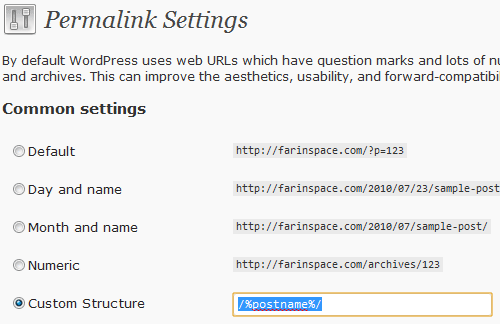
- Login to your WordPress Admin
- Navigate to Settings > Permalinks
- In the “Custom Structure” text field, enter in
/%postname%/ - Click the “Save Changes” button
If you have comments or improvement suggestions please let me know.
Thanks!
Finally rules that work 🙂
For www to non-www, you should set up a second virtual server
server {
   server_name www.example.com;
   rewrite ^ http://example.com$request_uri? permanent;
}

server {
   server_name example.com;
   ...
}
Also, instead of the
segment, you should use try_files
location / { try_files $uri $uri/ /index.php }Out of curiosity, are you familiar with an nginx/WordPress problem where rewritten pages (e.g. site.com/%postname%/) cannot properly proces $_GET vars? I’m running into this issue.
For the url site.com/page/?foo=bar&blue=smurf, print_r($_GET) is outputting q=>page and nothing else!
@Brad, thanks for the tips, the I’ve used the two server blocks when setting up ssl/https and doing a redirect, similarly I’ll update the post to use something similar.
I always read about nginx “if” being evil, but I can never find and concrete examples as to why? However, I do like the try_files option and will begin using that instead.
@mattonomics, I haven’t run into this problem … but I have been messing around a lot with nginx, php-cgi and php-fpm. While I am still not an expert, I would suggest you review the nginx/php configs … I can’t be for sure what is causing it, but you may have to play around a bit with it, setup a phpinfo.php page and test several settings, one specific setting to test is the
fastcgi_split_path_info, I am assuming your using php/fastcgi.just wondering why on my test site, in the permalinks settings wordpress seems to like to place an index.php in-between? it all works fine without…
http://www.diigo.com/item/image/1eygw/ois4
@Ovidiu, you can use this plugin fix that trouble:
http://wordpress.org/extend/plugins/nginx-compatibility/
@Fadlee: thanks, worked perfectly 🙂
Hey Dimas,
Any tips on combining WordPress AND CodeIgniter? I am running a WP install in the root folder (with this config, a modified version of the Roots WP Theme config: here). However, I’m also trying to migrate a CI app into a /subdirectory/ on my site. I’ve managed to get the default controller to show (without the index.php), but any other controllers or methods simply break and show my WP 404 page! HIstorically, the CI app used to run on an Apache server with pretty URL’s just fine.
Any help is appreciated 😀
I managed to sort it out after tweaking a few settings. 🙂 My config is available here.
you mind posting your nginx.conf?
im having issues getting mine working
Hi,
I found that the rule
rewrite ^(.+)$ /index.php?q=$1 last;adds a 'q' request parameter behind the scenes and although invisible for visitors browsing the site, it is seen by WP Super Cache in PHP mode. This results in no pages are handled by Super Cache because all requests with a GET parameter are being passed to WP Cache instead. Except the home page, that is...
Instead, the rule
rewrite ^(.+)$ /index.php last;seems to work equally well for WordPress and makes WP Super Cache behave nice on all posts and pages too :)
Awesome post!
I just put together an ubuntu server with Nginx and I could figure out what the issue was.
Thanks!
WORKS! Thank You 🙂
Thanks for this post. I’m trying to automate this rewrite tool to work with ispconfig.
Thanks for the post!
I set up a virtual host so that http://www.domain.com is rewritten to domain.com, that way the IF statement in the article is not needed.
Here is my complete virtual host file (rewrites http://www.domain.com to domain.com and has pretty URL’s enabled):
http://pastebin.com/v38KG0Mx
Please note that I am using a PHP port instead of a socket.
Been beating my head against the wall ALL day trying to figure out how to clean up the URLS with nginx. Thank you so so so much for this 🙂